Who's Bruno Willian

My photo
I'm Bruno, I've been working as a Dynamics CRM consultant since 2012. This blog is intended to share acknowledgement not only about Dynamics, but also any technology we use to extend the platform.

Monday, May 23, 2016

Dynamics CRM - Performance TIPs

In this post I will give you a few performance tips that may be the water divison between a good and a bad performance. I've recently been on a client where most of development was done without any performance caring, which has degraded CRM performance significantly, I'm pretty sure that many of you are aware of those practices but for those who don't, here it goes.

Well, without further ado, let's get straight to the point.

  • The addition of lookup fields and option sets to a Quick Find can slow system performance and should be avoided especially on large datasets
  • Too many fields on Quick Find - How much more fields added slower the search will be performed.
  • Retrieve all attributes when performing a query against the database - Try to narrow fields searched only for those you are going to use.
  • Plugins on update stage should not be triggered for all fields, only those that make sense.
  • Plugins on Retrive and RetriveMultiple message may cause significant delay performance 
  • For each entityreference field you retrieve a join is made, so avoid it when possible.
  • How many more linked entities or joins you make, slower your query will be processed, sometimes it' better to split up the query for performance improvement.
There it is, if you have any tip besides those I've described, please fell free to share!

Curiosity: In Dynamics CRM 2015 the image field is not retrieved when using all attributes tag.

Further information at: http://crmtipoftheday.com/2016/05/05/use-all-attributes-and-miss-some-of-the-data/

References: https://www.google.com/url?hl=pt-BR&q=https://mbs.microsoft.com/customersource/Global/CRM/learning/documentation/user-guides/PerformanceOptimizationsCRMOnlineSuccess&source=gmail&ust=1464145030739000&usg=AFQjCNFdcz7mGhcLYAOnYf6DoiDGPQ_6Ug

Tuesday, March 22, 2016

Dynamics CRM Business Rules TOP 10 Important Points

Here are some important points we should be aware about business rules.
  1. Dynamics CRM 2015 has introduced a new scope level “Entity”. Setting the scope of the business rule at an entity level, forces the business rule to be executed on both server and all clients side. 
    • For instance, if Contoso only does business in the United States, a simple business rule can be implemented that on creation of an incoming lead, the country/region is automatically set to U.S.A. If we try through plugin or workflow to create a lead and set country/region different than U.S.A there will be an error and the transaction will be rolled back.
  2. Setting up lookup fields using business rules.
    • If you define a rule to set a lookup to a contact that has the Full Name of ‘Henrique’, this text is the Name you will see in the lookup when it is set by your business rule even if someone later changes the Full Name of the contact to ‘Henrique2’. The lookup Id value will be correctly set to the expected record, but the Name (which is not saved) will reflect the rule definition value rather than the current Full Name value of the record it references. To fix that, you will need then to update the business rule.
  3. Updated business rules will only be applied on mobile apps when it's re-opened.
  4. Javascript OnChange event handlers are not triggered if a field value is changed by a business rule.
  5. You cannot call a Javascript method from a business rule
  6. Actions cannot apply to fields from related entities.
  7. Business rules which don’t run due to fields not included on the form will not cause an error, it just won’t run.
  8. Business rules run only when the form loads and when field values change. They do not run when a record is saved.
  9. Whole Number fields that use the formats for TimeZone, Duration, or Language will not appear in the rule editor for conditions or actions, so they cannot be used with business rules.
  10. Business rules cannot show/hide sections or tabs

References
  • https://crmbusiness.wordpress.com/2014/10/27/crm-2013-business-rule-workings-limitations-and-exam-notes/
  • https://adisys.wordpress.com/2014/12/15/crm2015businessrules/
  • https://technet.microsoft.com/en-us/library/dn531086.aspx#BKMK_ServerSideBR

Monday, March 21, 2016

Angular JS - Powerful framework

Hi everyone,

In the today's post, I will give you an example of how powerful is Angular framework.

The link below will lead you to an angular project I have made. It is a simple not-well-structured project, my intention here is not showing you Angular good practices, but give you and idea of how angular might speed up application development.

Project download link: https://www.dropbox.com/s/cy159kheqpxncfa/Angularjs.rar?dl=0

After you have downloaded the project, open it up, check out the basic features within it, try to realize how you would accomplish the same functionalities in .Net, also how much time would you have spent doing that?

I am not an angular expert, however it took me two hours to get it working the way it is right now.

Well, that's it!

Thank you, till next post!

Monday, March 7, 2016

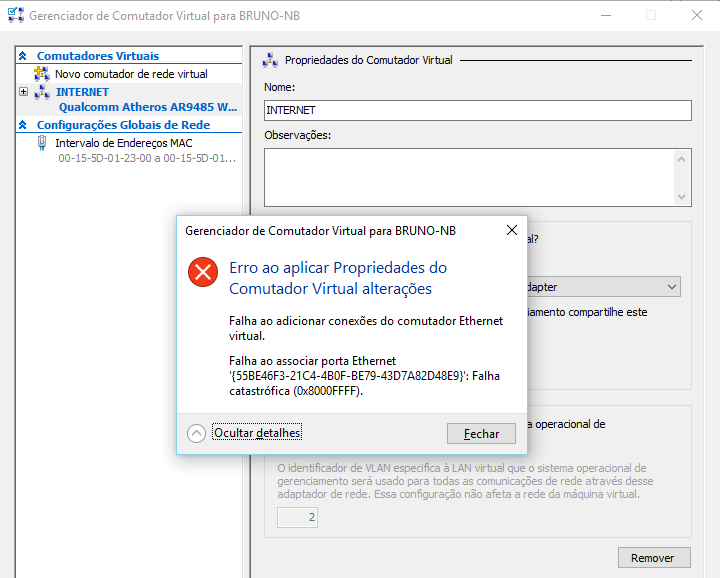
Falha ao Adicionar Conexões do Comutador Ethernet Virtual

Olá, este post será em português porque além do erro estar em português, não encontrei nenhuma referência em português que solucionou meu problema.

O erro ocorre ao tentar adicionar um Comutador Virtual no Hyper-V o seguinte erro é apresentado.


Para solucionar o problema, é necessário desabilitar o ICS (Compartilhamento de Conexão com a Internet)

Navegue até a conexão (No meu caso Wifi) e clique em propriedades.


Clique na aba Compartilhamento e então desmarque a opção Permitir que outros usuários da rede se conectem pela conexão deste computador à internet e pronto.


Friday, February 26, 2016

Importing Products Step By Step

It is not that easy to import products and all the structure related to them.

Therefore I've made a as simple as possible step by step how to do that, including some tricks that can't be forgotten.


  1. Create Unit Group manually: It's not possible to import Group Unit, you will have to create it manually one by one.
  2. Import Unit records: We are not able to import Units using the Data Template, to do that we will have to follow the following steps.
    1. Download Unit Data Template.
    2. Add a new column to the exported file naming it as you want. e.g: Unit Group Name
    3. We will fill in the new column with the related Group Unit reference.
    4. Save the file as CSV and import it mapping the new added column to the Unit Group entity.
  3. Import Subject (Optional): The only way to import subjects is through CSV file.
  4. Import Products
  5. Import Discount List (Optional)
    1. Import Discounts - Just like we did on the second step but now adding a reference on the Discount CSV to Discount List
  6. Import Price List
  7. Import Price List Item

Hope it helps!

Monday, August 11, 2014

CRM 2013 New Feature - Private Queues

Today I am going to give an introduction about a new queue type, private queues. It is known by everyone that once given a permission for someone to read queues the users granted with that permissions could see all queues in the system.

Some times it was a problem because there were too much queues in the queues view or maybe the customer wanted to restrict the queue access which was not possible until the last update release.

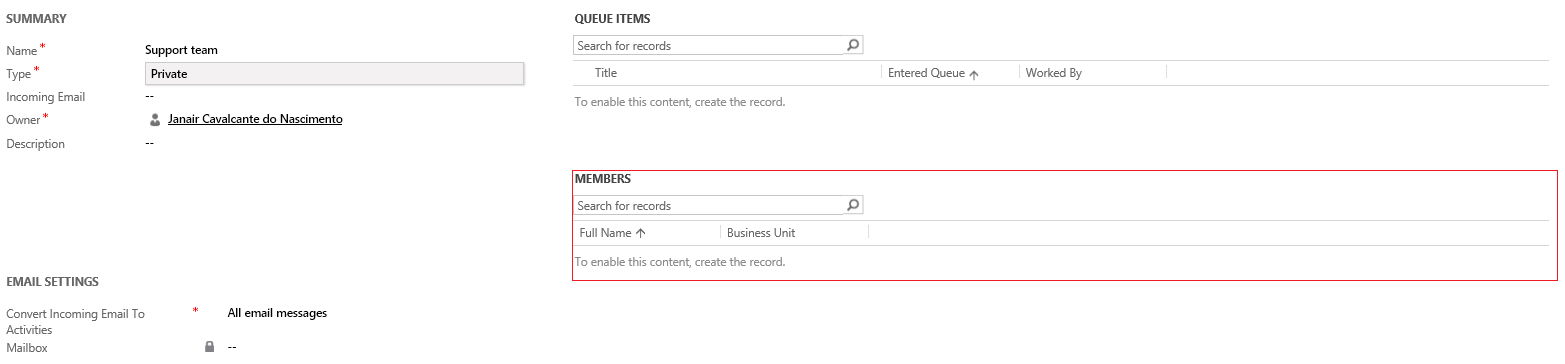
By creating a private queue we are able to restrict the queue access only to members of this queue. Note that when you chose private queue type a new grid of users appears on the queue form, just users added to this member list will be able to see the queue.

The owner of the queue is automatically added to the queue team.


Wednesday, January 29, 2014

Microsoft.Crm.ObjectModel.MultiCurrencyPlugin

Today I faced an error which took me about three hours to solve it, that messsage appeard when I tried to save a record which I was sure there was no plugins running against it.

Unhandled Exception: System.ServiceModel.FaultException`1[[Microsoft.Xrm.Sdk.OrganizationServiceFault, Microsoft.Xrm.Sdk, Version=6.0.0.0, Culture=neutral, PublicKeyToken=31bf3856ad364e35]]: An unexpected error occurred.Detail:
<OrganizationServiceFault xmlns:i="http://www.w3.org/2001/XMLSchema-instance" xmlns="http://schemas.microsoft.com/xrm/2011/Contracts">
  <ErrorCode>-2147220970</ErrorCode>
  <ErrorDetails xmlns:d2p1="http://schemas.datacontract.org/2004/07/System.Collections.Generic" />
  <Message>An unexpected error occurred.</Message>
  <Timestamp>2014-01-29T16:57:37.9734966Z</Timestamp>
  <InnerFault i:nil="true" />
  <TraceText>

[Microsoft.Crm.ObjectModel: Microsoft.Crm.ObjectModel.MultiCurrencyPlugin]
[f6d4ebbb-0075-407d-8208-26575bfa39af: MultiCurrencyPlugin]

</TraceText>
</OrganizationServiceFault>

I rummaged the whole internet trying to find out the cause of that issue without luck, people on the internet say that it's caused by currency field stuffs, however it wasn't in my case.

Tired I curiously went to check out plugin registration Assemblys, that's when I noticed that the following steps were disabled (don't ask me why).


Enabling those steps solved my problem.

Hope it helps someone else.